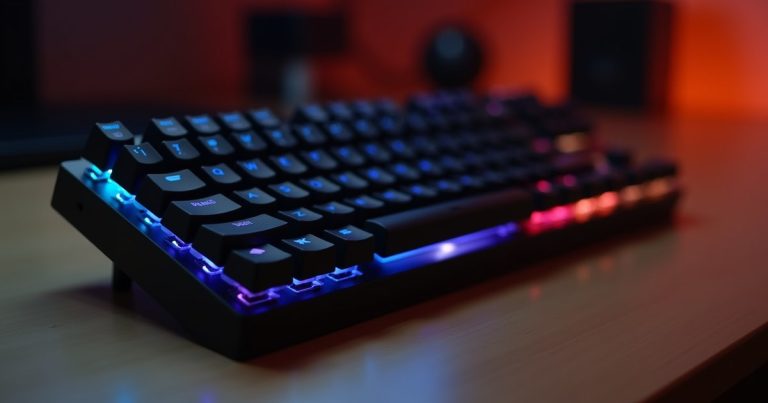
Best overall: Keychron K8 Pro (~$89) — wireless, hot-swappable switches, excellent typing feel. Best office/quiet typing: Keychron C3 Pro (~$39) with Brown switches. Best compact 65%: NuPhy Air75 (~$79) — wireless, slim profile, great for portability.
The $50–$100 mechanical keyboard category has matured significantly. Brands like Keychron have democratised quality mechanical keyboards — hot-swappable switches, aluminum cases, wireless connectivity, and double-shot keycaps used to cost $200+. Now they’re standard features in the $80–$100 range, and even sub-$50 keyboards offer genuine mechanical switch quality over membrane alternatives.
Best Mechanical Keyboards for Typing Under $100
1. Keychron K8 Pro (TKL 87-key) — ~$89 | Best Overall
The Keychron K8 Pro is the most complete keyboard in the sub-$100 category. It’s wireless (Bluetooth 5.1, connects to 3 devices simultaneously), compatible with both Mac and Windows out of the box (includes both keycap sets), hot-swappable (switch the mechanical switches without soldering), and uses Gateron G Pro switches — among the smoothest factory switches at any price point.
Available with Red (linear), Blue (clicky), or Brown (tactile) switches. For office typing: Brown or Red. For fast gaming-style typing: Red. For auditory feedback you like: Blue (not office-friendly). The tenkeyless layout removes the numpad to save desk space. The aluminum frame gives it a premium feel that belies the price.
2. Keychron C3 Pro — ~$39 | Best Budget Upgrade
The C3 Pro is wired-only with a plastic case, but it includes QMK/VIA firmware support (allowing custom key remapping), hot-swappable switches, and Gateron G Pro switches — features that cost $50–$70 extra on competing brands. At $39, it’s the best-value mechanical keyboard upgrade for a standard full-size or TKL user who primarily types at a desk.
With Brown switches, it’s genuinely usable in an open-plan office — tactile bump without the loud click of Blue switches. The typing sound is notably better than a typical membrane office keyboard, and the tactile feedback reduces typing errors for many users.
3. NuPhy Air75 V2 — ~$79 | Best Slim Wireless 75%
The NuPhy Air75 targets laptop users who want a mechanical keyboard that’s as portable as their laptop. It’s low-profile (similar keycap height to a MacBook keyboard) with 16mm total height — thinner than standard mechanical keyboards. Bluetooth 5.0 connects to 4 devices, and the 75% layout (includes arrow keys and a function column) provides a balanced compact size.
Available with NuPhy’s own low-profile switches in Red, Blue, or Aloe (their tactile option). Battery life is excellent at 3,000mAh — weeks between charges with backlight off. For MacBook users who want mechanical feedback without sacrificing portability, the Air75 V2 is the best option currently available under $100.
4. Akko 5075B Plus — ~$69 | Best Full Feature Set Under $70
Akko’s 5075B Plus includes gasket mounting (provides a softer, more cushioned typing feel than tray-mounted keyboards), hot-swap switches, wireless Bluetooth + wired connection, and south-facing RGB LEDs (compatible with shine-through keycaps) — all for $69. The gasket mount alone is a feature usually found on $150+ custom keyboards. Available with multiple Akko switch options including their popular CS series tactile and linear options.
Frequently Asked Questions
Which mechanical switches are best for typing (not gaming)?
For typing accuracy and comfort: tactile switches like Brown (Gateron, Cherry, Akko) are most popular — they provide a tactile bump when the key registers without the loud click of Blue switches. Linear switches (Red) are smooth with no feedback bump, preferred by gamers. For office environments: Browns strike the best balance of typing feel and acceptable noise level.
Is a 75% or TKL keyboard better for desk use?
TKL (tenkeyless, 87-key) removes the numpad and provides a familiar full-size key layout — the better choice if you type heavily or use keyboard shortcuts that span the board. 75% keyboards remove the numpad AND compress the navigation cluster, saving more desk space. If you regularly use the numpad for numbers or navigation, stick with TKL. If you never use the numpad, 75% gives more mouse space and a tidier desk.
Final Thoughts: The Keychron K8 Pro at $89 is the best all-around recommendation for most typists — wireless, hot-swappable, Mac/Windows compatible, and genuinely well-built. For the budget-conscious, the Keychron C3 Pro at $39 provides similar switch quality in a wired form factor that’s hard to beat. The upgrade from any membrane keyboard to either of these will be immediately noticeable.
Shop Keychron Keyboards Direct
Keychron’s own site often has better pricing and bundle deals than Amazon.
Prices shown are approximate as of May 2026. Switch options and availability vary — always check stock and shipping times on the manufacturer or retailer site before ordering.